
History and reprints
Historik (History) shows deliveries that are approved. From here you print the delivery list or the pallet labels again if printing failed or the paper has gone missing.
Before you start
- At least one delivery list is approved, see Deliveries. Otherwise it says "Inga leveranser" (No deliveries).
See earlier deliveries
Tap Historik on the start page. Each row is a delivery list with its number, the number of orders, Levererad (Delivered) with date and time, and status Slutförd (Completed).
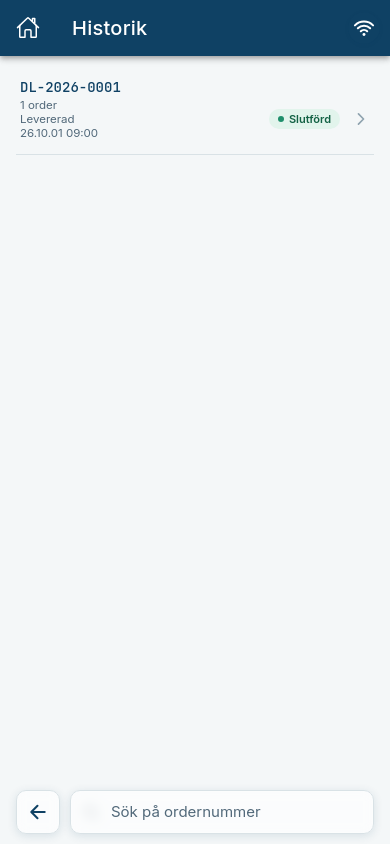
Tap a row to see which orders were included.
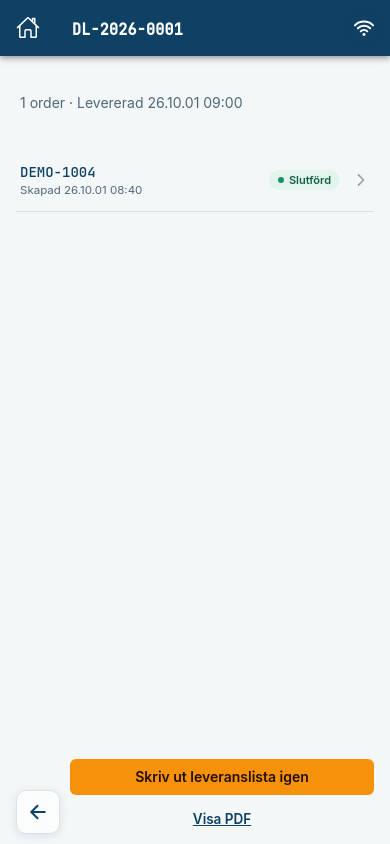
Print the delivery list again
- Open the delivery in Historik.
- Tap Skriv ut leveranslista igen (Print delivery list again).
Expected: A card shows Väntar på bekräftelse från Cloudlabel (Waiting for confirmation from Cloudlabel) and then Märkning klar (Labelling done). The list is printed once, even if it has several orders, and the reprint shows in Historik on every order on the list.
Print the pallet labels again
- Open the delivery in Historik and tap the order.
- Tap Skriv ut palletiketter igen (Print pallet labels again).
- Choose Alla pallar (All pallets) or the pallets you want to print, and tap the Skriv ut (Print) button.
Expected: A card shows Väntar på bekräftelse från Cloudlabel and then Märkning klar. Only the pallets you chose are printed, and the reprint shows in the order's Historik. You don't have to wait for the confirmation: the card can be closed with the cross.
Can be switched off
Reprinting the delivery list and pallet labels is a function your company can have switched off. The button is then missing.
If the print does not go through
The same rules apply as for the first print. The error stays on the card until you close it, and it also shows in the order's Historik.
| Status | What it means | What to do |
|---|---|---|
| Kunde inte skicka utskriften (Could not send the print job) | The pallet labels never reached Cloudlabel. | Tap Testa igen (Try again). The same pallets are sent again. |
| Kunde inte bekräftas (Could not be confirmed) | Cloudlabel answered with an error. | Check the printer. If nothing came out, print again with the button. |
| Kunde inte bekräftas inom tidsgränsen (Could not be confirmed in time) | Cloudlabel did not answer in time. | Check the printer. If nothing came out, print again with the button. |
Tar längre tid än vanligt (Taking longer than usual) is only a note, not an error. Packstep is still waiting for an answer.
Without a connection
If you tap the button without a connection, the print goes into the queue. The card shows I print-kö (In the print queue), the order is listed under Ej synkat (Not synced) and Historik says Väntar på synk (Waiting for sync). The print is sent by itself when the connection is back.
The button is locked while the print is queued, so that it isn't queued twice. If the print could not be sent when the connection came back, it is listed under Kunde inte synkas (Could not be synced).
Common errors
| Message | What to do |
|---|---|
| Kunde inte hämta historiken. Kontrollera anslutningen och försök igen. (Could not fetch the history.) | Check that you are online and try again. |
| Leveransen kunde inte hittas. Den kan ha tagits bort. (The delivery could not be found.) | Go back to the list. |