
The start page
As a TenantAdmin you begin on a start page of your own. From here you reach what an Operator does, manage the users and set how the app works for your company.
Before you start
- You are signed in as TenantAdmin, see Signing in and out.
- You can do everything an Admin and an Operator can. This page only shows what is new.
The start page's cards
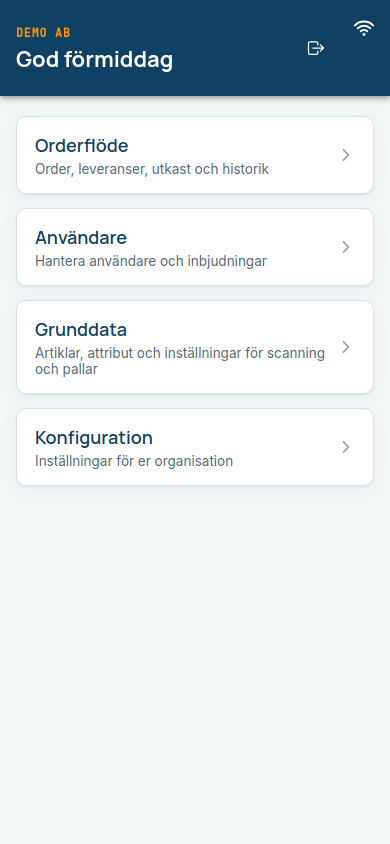
| Card | What it does |
|---|---|
| Orderflöde (Order flow: "Order, leveranser, utkast och historik") | Opens the same main menu an Operator has, with Order, Historik (History), Leveranser (Deliveries) and Utkast (Drafts). See Orders. |
| Användare (Users: "Hantera användare och inbjudningar") | The user list, invitations and the activity log. See Users and invitations. |
| Grunddata (Base data: "Artiklar, attribut och inställningar för scanning och pallar") | Your article register and the settings for scanning and pallets. Only there if Packstep has switched base data on for you. See Base data. |
| Konfiguration (Configuration: "Inställningar för er organisation") | Which functions the operators have, order data, automatic sign-out and logo. See Configuration. |
Expected: The arrow at the bottom left of every view takes you back. From the Order flow's main menu it leads to the TenantAdmin start page.
At the top you see your company name if Packstep has added it, and your logo if you have uploaded one, see Configuration.
You have a lot of permission
As a TenantAdmin you can pause and archive users, invite new ones and change what all operators see in the app. Your changes are written to the activity log, with you as the actor. Never share your one-time code with anyone, and sign out when you leave the device.
Common questions
| Question | Answer |
|---|---|
| Where is the Order card? | It is under Orderflöde. |
| I do not see a function the manual describes. | Functions are switched on per company by Packstep (Superadmin). What you see under Konfiguration is what is available to you. |